Calibrate
Sit in your usual working position, face the camera, close your mouth, and let NoseFlow learn that baseline.

 NoseFlow
— Breath Better —
NoseFlow
— Breath Better —
NoseFlow is a sophisticated AI-powered health app that encourages nasal breathing and improves overall respiratory health while you use your Mac.
Download on the Mac App StoreHow it works
Vision analysis runs on your Mac. Camera frames are used to measure mouth position. They are not uploaded.

Sit in your usual working position, face the camera, close your mouth, and let NoseFlow learn that baseline.
Minimize the window. NoseFlow keeps checking on your interval while you use other apps.
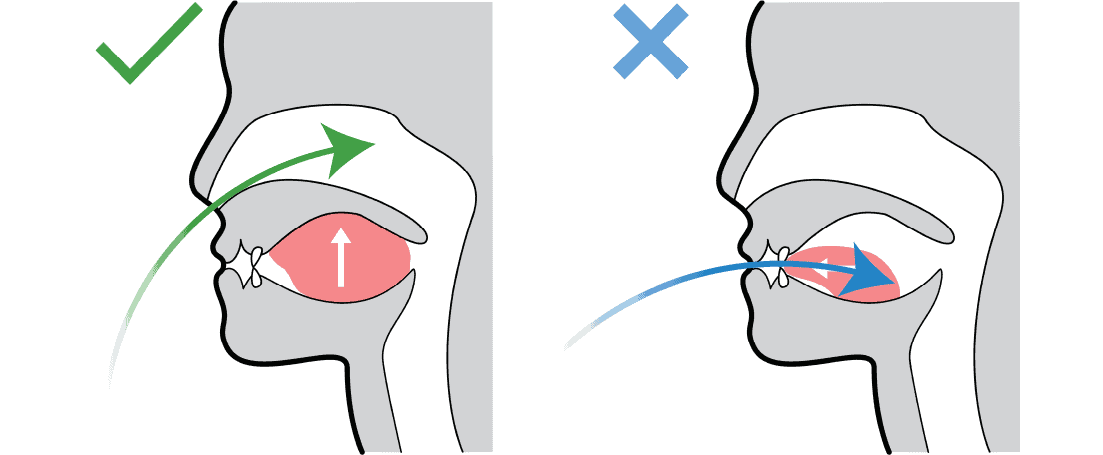
If mouth breathing is detected, a notification asks you to close your mouth and breathe through your nose.
Why it exists
Mouth breathing while you work is easy to miss. NoseFlow is a habit cue, not a medical device. It helps you notice the pattern and return to nasal breathing.
Quick start
If your head angle or lighting changes a lot, recalibrate from the same nose icon.
Help
Need setup, permissions, or troubleshooting? See the full NoseFlow help page.
Detection uses Apple Vision on the device. NoseFlow is built to watch mouth position locally, not to record or upload your camera feed.
People sit at different distances and angles. Calibration sets a closed-mouth baseline for your usual posture so alerts are less noisy.
No. NoseFlow is a habit reminder for nasal breathing. It is not a diagnosis, treatment, or medical device.
Support
Email support@argoapps.co with what you were doing, your macOS version, and what you expected to happen.